A plain-English guide to how generative AI really works, how it’s different from traditional AI, and what SME leaders need to know to use it effectively.
“What’s Generative AI, and how’s it different from AI we’ve used before?”
This is a question I was curious about when I first started using generative AI tools over three years ago. Like many marketers and business leaders, I didn’t come from a machine learning background. I just wanted to understand what’s actually going on when you type a prompt into something like ChatGPT and it spits out a remarkably articulate reply.
So, here’s the plain-English explanation that made it click for me, which I’ve updated – as at January 2026 – with real-world examples and verified sources.
What Actually Happens When You Ask ChatGPT a Question?
Let’s strip back the hype.
Generative AI doesn’t think or understand like a human. It has no awareness or intent. But today’s models can follow reasoning patterns, especially when guided step by step. Techniques like chain-of-thought prompting and reflection allow them to simulate multi-step thinking and refine their answers.
What they do best is recognise patterns in language and use those patterns to produce clear, often useful responses.
A Simple Mental Model
Imagine a system that’s been trained by reading:
- Books, articles and news stories
- Websites, documentation and code
- Forums, social media and online conversations
From that, it learns how language flows — how sentences are structured, how questions are asked and answered, and how topics relate to one another.
That becomes its internal understanding of how to communicate.
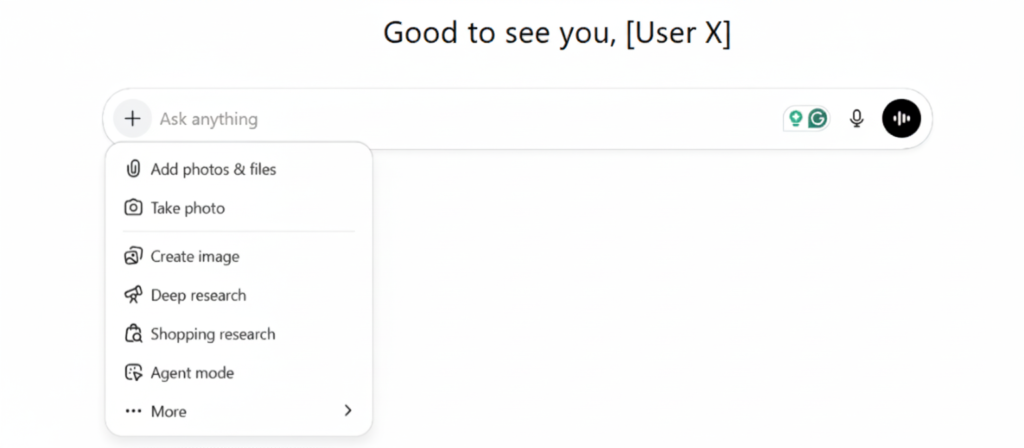
Step-by-Step: From Prompt to Response1
1. You ask a question
Example: “What’s the capital of France?”
2. The model interprets intent
It analyses your phrasing, picks up the context, and predicts what you’re likely trying to find out.
3. It may or may not search the internet
Some generative AI models — including certain versions of ChatGPT, Gemini, and Microsoft Copilot — can access the internet in real time to retrieve the latest information. Others work purely from their training data without any live browsing. If web access is enabled, the model will look online for relevant sources before generating a response.
4. It generates a response word by word
The model doesn’t retrieve a pre-written answer. Instead, it builds a new one on the fly, predicting each word (tokenisation) based on what came before — using its training data and, if available, any live web content it retrieved.
5. It sends the result back to you
Typically in a few seconds. No magic — just high-speed pattern recognition, prediction and language generation.
What’s Going on Under the Hood?
Here’s the high-level version…
- Training: The model is trained on huge volumes of text to learn how words, phrases and ideas connect.
- The model itself: Not a brain, but a probability engine that calculates what word (or image pixel or sound) is most likely to come next.
- Generative output: Unlike traditional systems that classify or sort, generative AI produces new content each time — which is why no two responses are exactly the same.
How Foundation Models Are Built2
Generative AI tools rely on foundation models, which are created using:
- An algorithm: Often a transformer-based neural network architecture, designed to process large volumes of data efficiently.
- Training data: Billions of words, images or lines of code scraped from the public internet, books, forums and more.
- Pre-training: The model learns general patterns and structures — for example, how sentences flow or how code behaves — without a specific task in mind.
- Post-training (fine-tuning): Developers then teach the model how to behave in certain contexts (e.g. writing politely, avoiding misinformation) using smaller, more curated datasets or human feedback.
How Generative AI Differs from Earlier AI
Traditional AI tools were often:
- Rules-based
- Focused on classification or prediction
- Narrow in scope
They answered questions like:
- Is this email spam?
- Will this customer churn?
- What’s the forecast for next quarter?
Generative AI answers a very different kind of question:
- Write a product description
- Generate a social media post
- Create a design mock-up
- Build a rough first draft of code
This is about creating, not just analysing.
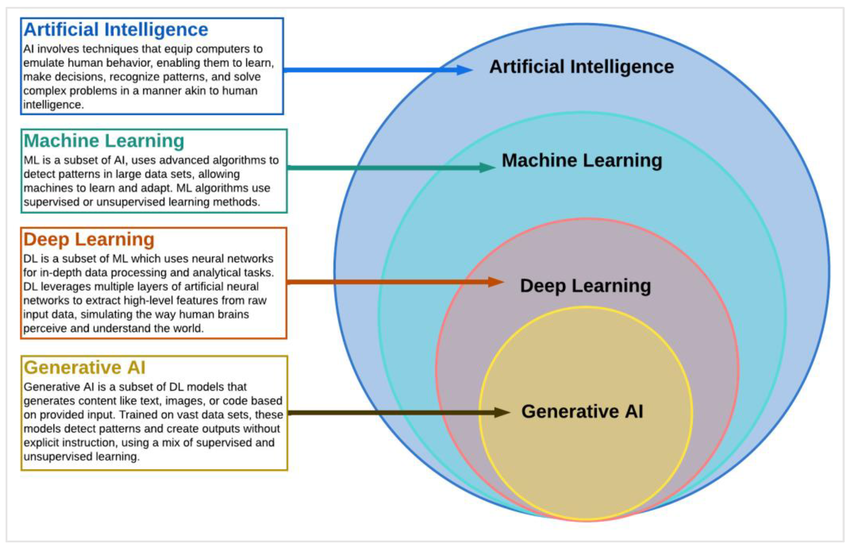
AI Hierarchy & Key Terms (Simplified)
AI → Machine Learning → Deep Learning → Generative AI
- AI: The broad category of machines mimicking intelligent behaviour
- Machine Learning: Systems that learn from data without being manually programmed
- Deep Learning: A method using layered neural networks for complex data
- Generative AI: A branch of deep learning focused on creating new, original outputs
Quick Definitions With Examples
AI: Any system that simulates intelligent tasks
Example: Alexa understanding voice commands
Machine Learning (ML): Learns from data and improves over time
Example: Email spam filters adapting based on what you mark as junk
Deep Learning (DL): Neural networks that process unstructured data
Example: A self-driving car recognising road signs and pedestrians
Generative AI: Creates brand-new content
Examples:
- ChatGPT – generating blog posts
- Midjourney – creating images
- GitHub Copilot – suggesting code
- ElevenLabs – producing voiceovers
- Runway – generating videos from prompts
Popular Foundation Models (As at January, 2026)
- OpenAI GPT-5.2
- Google DeepMind Gemini 3
- Anthropic Claude 4.5 (Haiku, Sonnet, Opus)
- Meta LLaMA 4
- xAI Grok 4.1
These large models are pre-trained on broad data and can be adapted to different tasks. Companies build tools on top of them, instead of starting from scratch.
Tools You Might Already Be Using
Many apps you may be using right now are powered by these foundation models, including:
- ChatGPT
- Microsoft Copilot
- Notion AI
- Jasper
- Replit
- Salesforce Einstein GPT
- Meta AI
- Grok (on X)
Different user interfaces, similar underlying engines.
The Takeaway for Business Leaders
Generative AI isn’t just a smarter search tool. It’s a new kind of productivity engine — capable of creating content, summarising information, answering questions, and assisting with complex tasks, all at speed and scale.
Understanding how it works helps you use it more effectively. It’s not thinking or understanding like a human, but it can follow reasoning patterns, simulate structure, and generate useful outputs based on learned data.
E.g. use it for:
- Drafting marketing copy, performance reports or product descriptions
- Personalising customer communication at scale
- Speeding up research summarisation or document handling
- Reducing the burden of routine creative or operational work
The better you understand its strengths and limits, the more confidently you can apply it as a practical tool that supports your team, sharpens your message, and gives you back valuable time.
For more on real-world use cases and how businesses are putting this into practice, take a look at some of my other blogs.